Claude Code replaced over $1,100 a year of plugins in my WooCommerce template shop
This month I rebuilt my websites, and Claude Code ended up replacing most of the paid plugins in my WooCommerce template shop. Checkout, popups, discounts, filters, badges, email forms and product page layouts all run on custom code now.
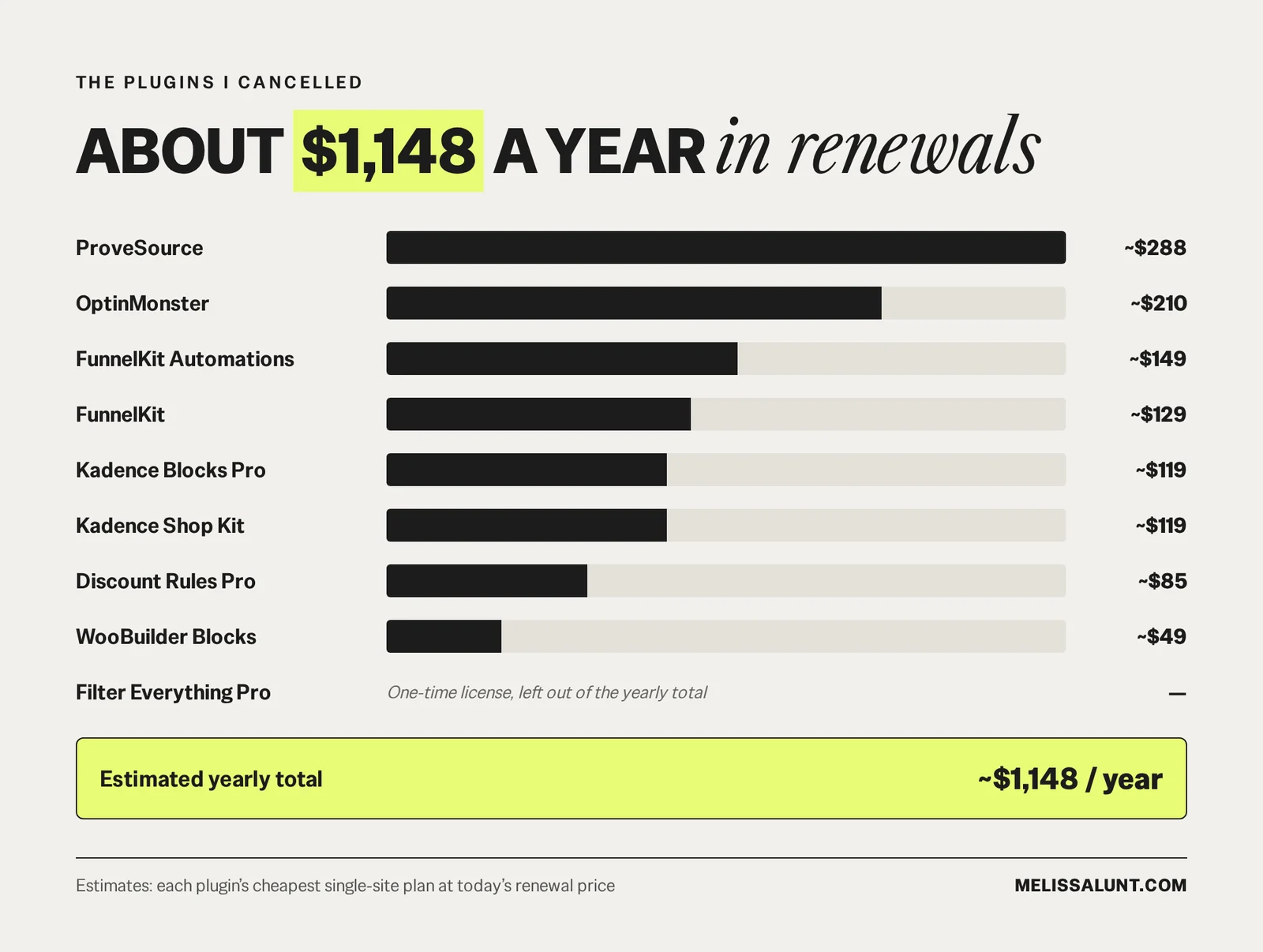
Short answer: the plugins I cancelled add up to about $1,148 a year in renewals. I was already paying for Claude before the rebuild, so that whole plugin bill is just gone.
Before I cancelled anything, I went through every paid plugin and asked one question: how much of this do I actually use? For most of them, honestly, the answer was one or two features. I was paying a yearly renewal for an entire plugin to get a small piece of it.
Here’s what I cancelled, what it costs, and what Claude Code built instead, so you can decide whether to replace WooCommerce plugins with Claude Code in your own shop.
Which plugins did I cancel, and what do they cost?
These prices are estimates based on what each plugin sells for today, at its cheapest single-site plan and full renewal price. Some of these have bigger plans, so the real number can run higher.
- FunnelKit: about $129 a year
- FunnelKit Automations: about $149 a year
- OptinMonster: about $210 a year
- ProveSource: about $288 a year
- Kadence Blocks Pro: about $119 a year
- Kadence Shop Kit: about $119 a year
- Discount Rules Pro: about $85 a year
- WooBuilder Blocks: about $49 a year
- Filter Everything Pro: a one-time license, so I left it out of the yearly total
That adds up to about $1,148 a year, every year, before any plan upgrades.
What about the cost of Claude?
My Claude plan runs $20 or $100 a month, depending on how much I need to get done that month. I was already paying for it before the rebuild, because I use Claude for so many other tasks in my business, like copy, planning and design work. The plugin renewals were a separate bill on top of that, and now that bill is gone.
What did Claude Code build instead?
Every one of these lives in my site’s theme now. No license keys, no renewal emails and no separate plugin settings pages. (Want screenshots? Here’s a closer look at all six features.)
1. A recent-sales popup
The popup shows real paid orders from the last 30 days, with the product image, the product name and where the buyer is from. It only counts paid orders, skips my own test orders, and stays off the cart, checkout and account pages so it never distracts someone in the middle of buying. The list of recent orders is built on my own site and refreshed every hour, so nothing loads from an outside service.
Replaced: ProveSource
2. One product page design per category
Every product used to have its design built into its own description. Changing a layout meant opening products one at a time and editing each one. Now each category has one shared design. I change it once and every product in that category updates.
Replaced: WooBuilder Blocks
3. A distraction-free checkout
The checkout page has no header, footer or sale banners. There’s the logo, a “Back to cart” link and the order summary with product images. “Instant access, nothing ships” sits next to the Place order button, because people buying digital products always wonder about that. On phones, the total and the Place order button sit near the top of the page.
Replaced: FunnelKit
4. A “Complete your collection” bundle box
Product pages show related products with checkboxes, a running total and one button to add everything at once. When two or more of them are in the cart together, each one is 30% off its regular price. The bundle discount never stacks on top of a sale price.
Replaced: Discount Rules Pro
5. Shop filters and best seller badges
A horizontal filter bar sits above the product grid, so shoppers can narrow things down without a sidebar. Best sellers get a “Best seller” badge on their product cards.
Replaced: Filter Everything Pro and Kadence Shop Kit
6. Email forms built into the site
My MailerLite signup forms are built right into the site, and every email automation runs inside MailerLite.
Replaced: OptinMonster and FunnelKit Automations
What changed besides the money?
Fewer plugins means fewer updates to run every month, fewer things that can break after one of those updates, and less code loading on every page of the site.
How do you figure out which of your plugins Claude Code could replace?
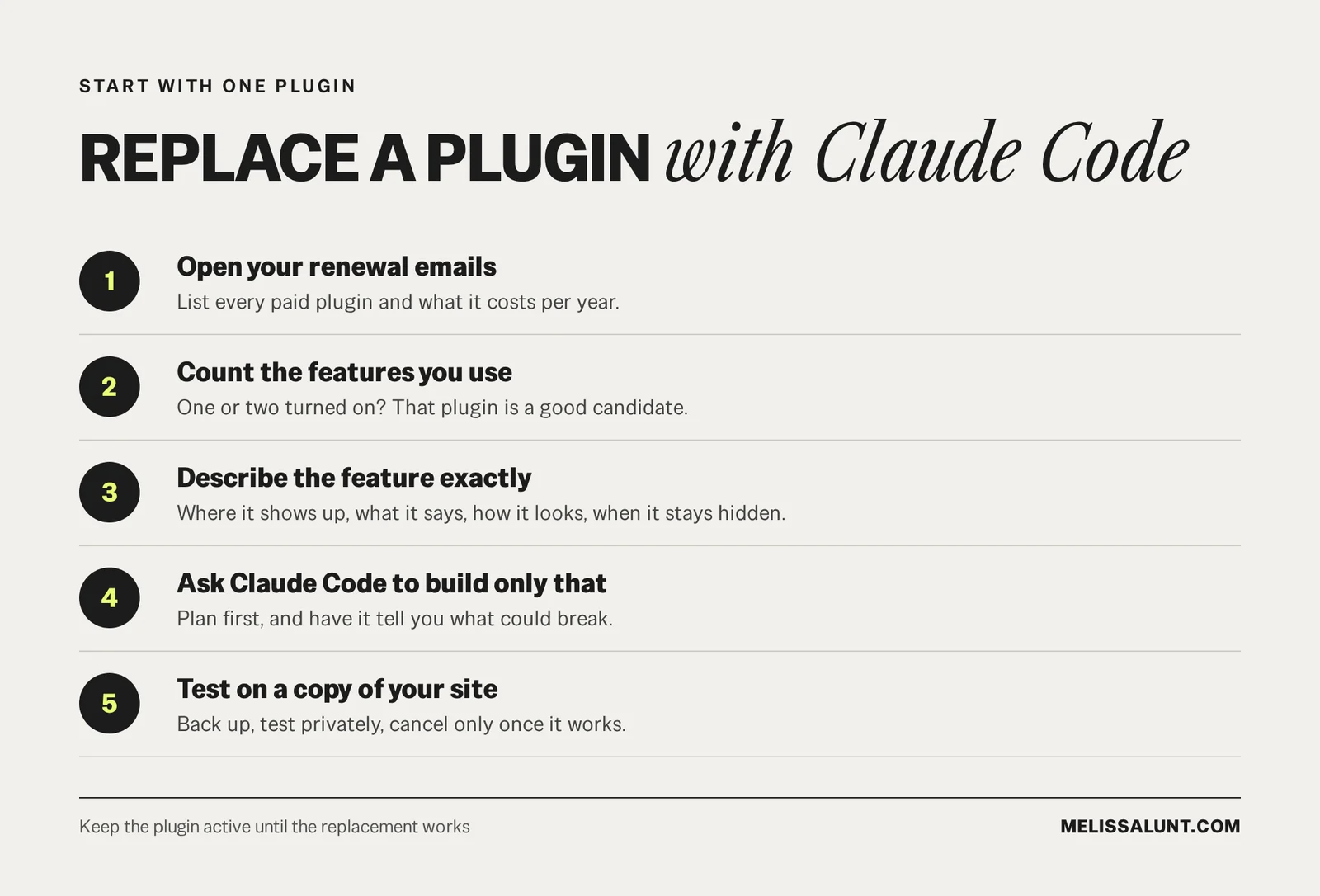
You don’t need to rebuild your whole site to try this. Start with one plugin.
- Open your renewal emails. List every paid plugin and what it costs per year.
- Count the features you actually use. Open each plugin’s settings. If you’ve turned on one or two things, that plugin is a good candidate.
- Write down exactly what that feature does on your site. Where it shows up, what it says, what it looks like, and when it should stay hidden.
- Give that description to Claude Code and ask it to build only that. A specific description gets you a specific result. “A sales popup” is too vague. “A small popup in the bottom left that shows a real paid order from the last 30 days, hidden on checkout” is something Claude Code can actually build.
- Test it on a copy of your site first. Back up your site, try the new version somewhere private, and only cancel the plugin once the replacement works.
Here’s a starting prompt you can adapt:
My WooCommerce shop uses [plugin name] only for [the one feature]. I want to replace it with custom code in my child theme so I can cancel the plugin. Here’s exactly what the feature needs to do: [where it appears, what it shows, when it’s hidden, how it should look]. Before writing anything, tell me your plan and what could break, and wait for my approval. Keep the plugin active until I confirm the replacement works.
If you want a fuller checklist first, here’s how to audit your WordPress plugins before they renew.
Which plugins should you keep?
Not every plugin should go. Payments, security and backups are not the place to save $80 a year. If a plugin does a big job well and you use most of it, keep paying for it.
FAQ
How much did Claude Code save me on plugins?
About $1,148 a year in renewals. That’s an estimate based on each plugin’s cheapest single-site plan at today’s renewal price, so the real number can run higher. Filter Everything Pro was a one-time license, so it isn’t in that total.
Doesn’t Claude cost money too?
Yes. My Claude plan runs $20 or $100 a month, depending on the month. I was already paying for it for copy, planning and design work before the rebuild, so the plugin renewals were a separate bill on top of it.
Is it safe to replace a plugin with custom code?
Do it carefully. Back up your site, test the replacement on a private copy, ask Claude Code for its plan and what could break before it writes anything, and keep the plugin active until the replacement works.
Which plugins shouldn’t you replace?
Payments, security and backups. If a plugin does a big job well and you use most of it, keep it.
Before the next renewal email lands
If you’re renewing a plugin every year for one small feature, ask which ones Claude Code could replace before the next renewal email lands.